Android app
Habits that survive a tougher week
Grooveday helps you build habits in small steps. You check them off with a single tap, and when a weaker day comes along, your plan can take it.
Coming soon to Google Play
See what it can doThe app is currently available in Polish.
- No account
- Data only on your phone
- Works without internet

Features
Simple every day, calm in its summaries
Grooveday shows you how things are going and never compares you with anyone. No leaderboards, no race – just your own pace.
-
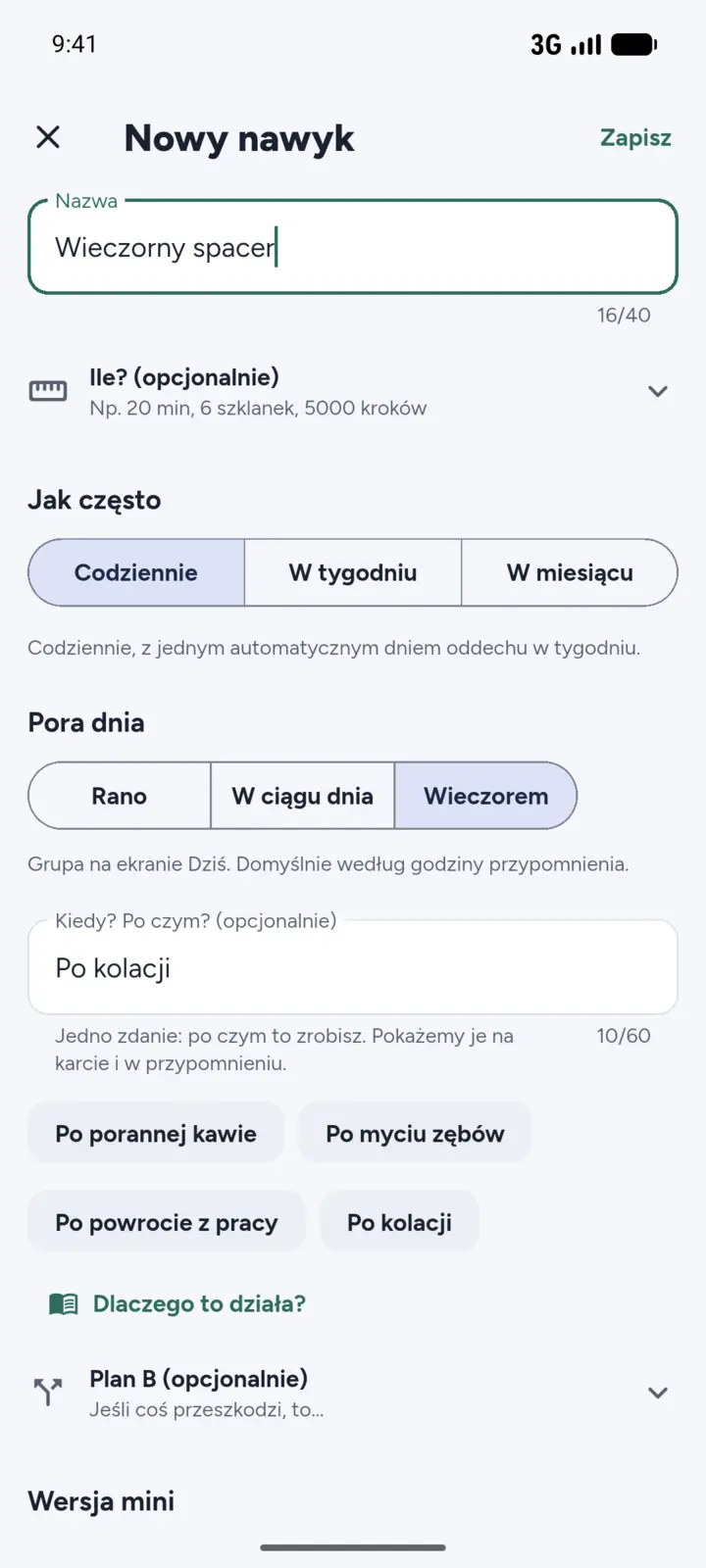
New habit
A habit that fits you
Give your habit a name, an icon and one of 10 colours. Choose how often: every day, a few times a week or a few times a month. You can also set an amount, e.g. 10 pages or 20 minutes.
- The “When? After what?” field links the habit to something you already do, e.g. “After my morning coffee”.
- A reminder at the time you choose.
- Plan B and the Mini version right in the form, if you want them.
-
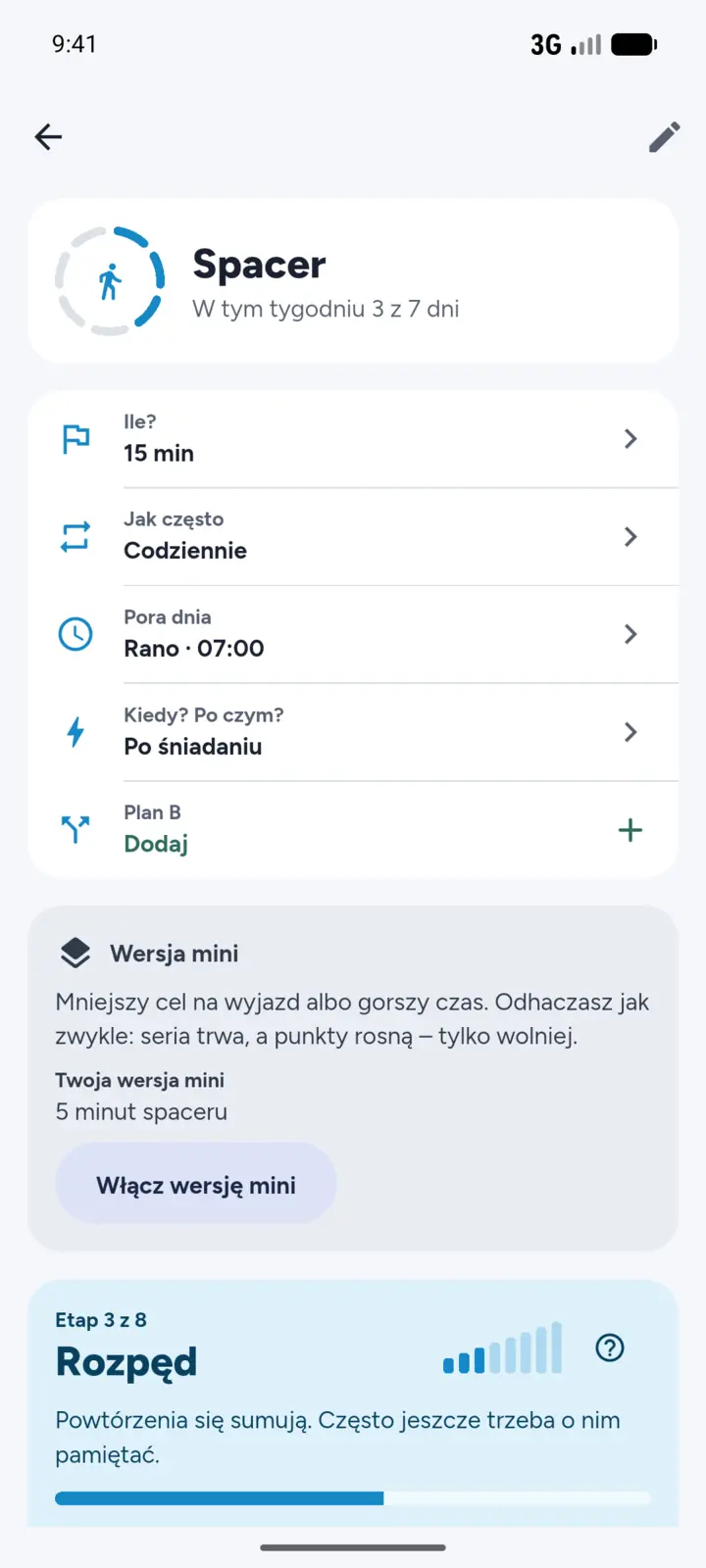
Habit strength
Points and 8 stages, not just a streak
Every habit collects points, from 0 to 1000. They grow quickly at first, then more slowly as the habit settles in. A short break changes little, and a stage you have already reached comes back faster than the first time.
- 1Start
- 2First steps
- 3Momentum
- 4Rhythm
- 5Skill
- 6Steadiness
- 7Ease
- 8Roots
Prefer no numbers? Hide points, streaks and stages with one switch in Settings. Your progress is still saved.
-
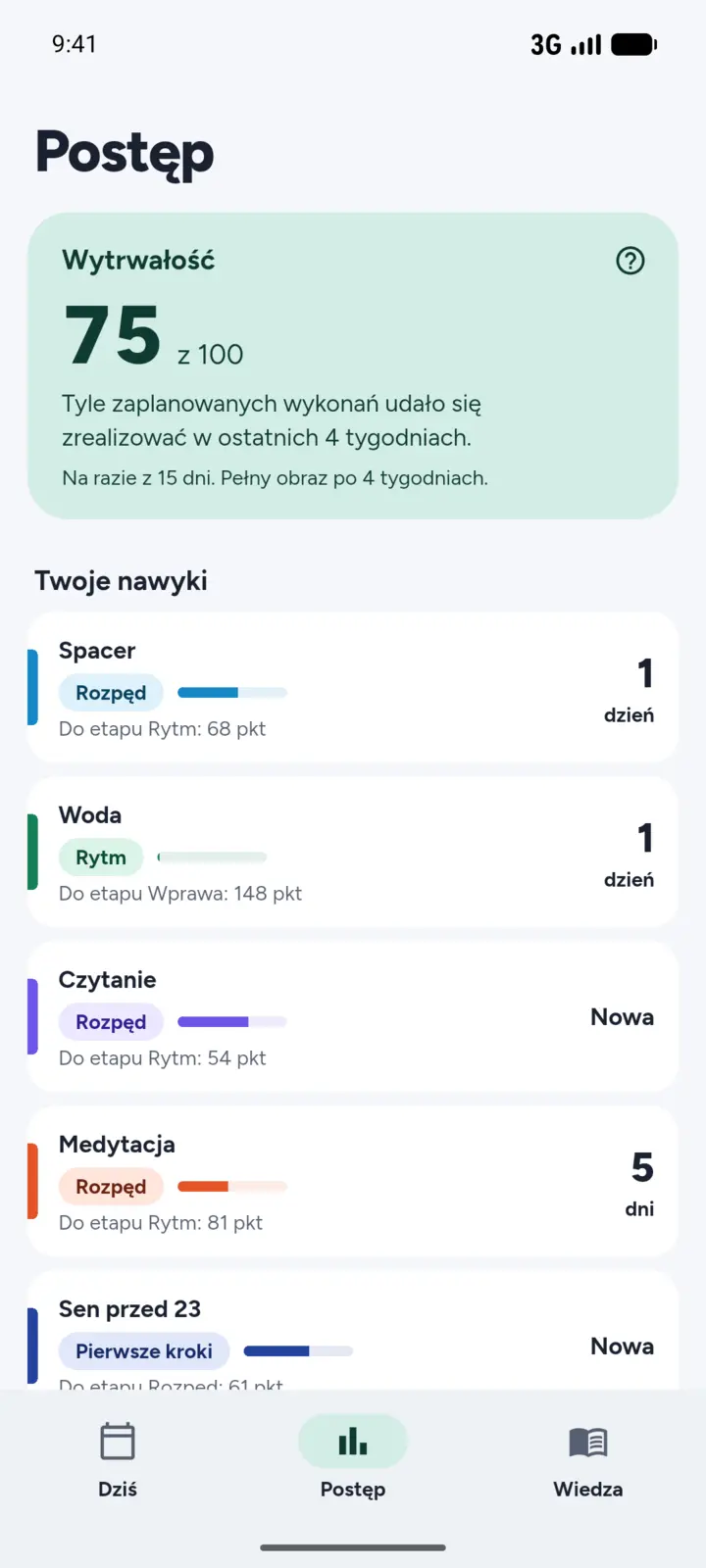
Progress
Persistence that doesn’t judge
Persistence is a number from 0 to 100. It shows what share of your planned check-ins you managed over the last 4 weeks. Next to it, a grid of those weeks: check-ins, Mini version, breather days and “Not today”. At the start of each week, a short summary waits for you on the Today screen.
This summary is for you, not a grade.
-
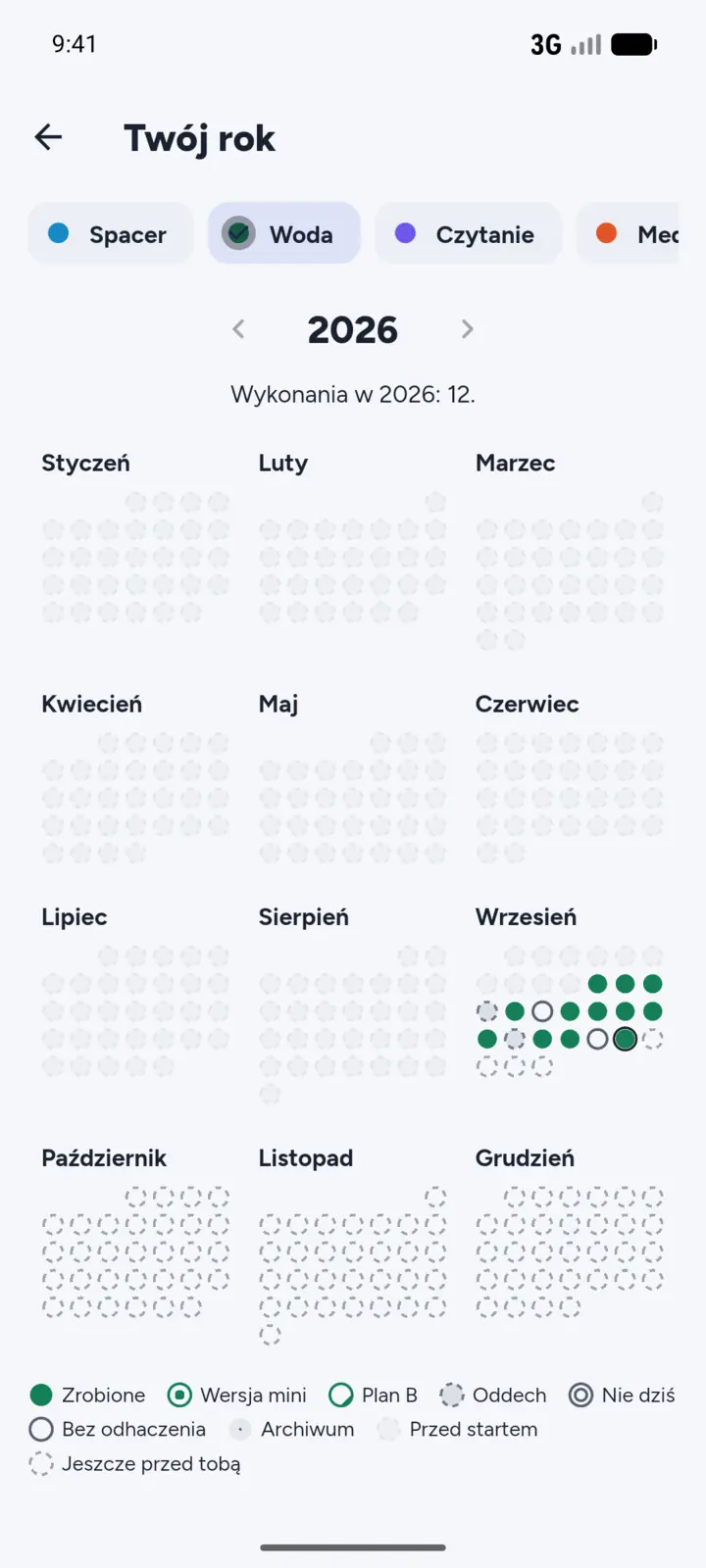
Year map
Your year on one map
Twelve months in one view: check-ins, Mini version, Plan B, breather days and “Not today”. Tap a day if you want to fill in a record.
You can export your whole history to a CSV file, e.g. for Excel.


How Grooveday works
A bad day? You have 4 ways out
Life doesn’t always go to plan, and Grooveday allows for that. Instead of starting from zero, you choose a smaller step.
-
Mini version
Less of the same, e.g. 5 minutes instead of 20. Set it for a few days or for chosen dates, up to 30 days. You check it off as usual, and your streak carries on.
-
Plan B
A different, easier activity when something gets in the way. One sentence written in a calm moment, e.g. “If the weather is bad, I’ll do it at home”.
-
“Not today”
A day off, chosen on purpose. Two a month are neutral: points and streak stay the same, and that day’s reminders go quiet.
-
Breather day
Happens on its own: for a daily habit, the first missed day of the week doesn’t break your streak or take away points.
Coming back without guilt
When a break goes on longer, Grooveday doesn’t count losses or send pushy notifications. When you open the app, it suggests a small step, such as the Mini version or your Plan B.
Need a longer break? A habit can rest in the archive: reminders go quiet, points don’t change for the first 14 days, and you can bring the habit back with one tap.
At the start of each month and year (and after a tougher week, on Monday too), a Fresh start card appears: a good moment to come back or adjust something.
Back to “Walk”?
The last few days went differently than planned. It happens, and a few days off don’t cancel anything. The easiest way back is a small step.
Your Plan B: “If the weather is bad, I’ll do it at home.”
Privacy
Your habits stay on your phone
You don’t create an account and you don’t send anything. Everything you record goes into an encrypted database on your phone and stays there.
-
No account
No email, no password. Open the app and start.
-
No internet
The app doesn’t have permission to connect to the network. It sends no data and has no ads or analytics.
-
Encrypted database
Your data is encrypted, and the key is protected by Android Keystore on your phone.
-
Backups under your control
You make backups yourself: to a file or to a folder you choose. The backup file isn’t encrypted, so keep it somewhere safe.
This website doesn’t use cookies or analytics either.
Read the privacy policyWidget and reminders
Check off habits before you open the app
A home screen widget
Today’s habits, in time-of-day order: morning, daytime, evening. One tap checks a habit off without opening the app.
Others can see your screen? Hide the names – only coloured dots will remain.
Calm reminders
One calm notification a day per habit, at the time you choose. On a “Not today” day there won’t be any reminders.
- Donesaves the check-in straight from the notification.
- Laterreminds you again in an hour, no later than 23:00.
- Skip todaymarks “Not today”, and that day’s reminders go quiet.


Knowledge
105 short articles about habits
How habits work and what helps when things get harder. Short, in plain language, with sources at the end of every article. Everything is inside the app, so you read without internet.
The articles support you in building habits. They are not medical or psychological advice.
- Basics
- Planning
- Motivation
- Tougher days
- Everyday life
The articles are in Polish, like the rest of the app.
The app’s own rules, from points to “Not today”, are in Settings: “How Grooveday works”.

Questions
Quick answers to what you ask
Do I need to create an account?
No. Grooveday works without an account or sign-in. All your data stays on your phone.
What if I miss a day, or a few?
Nothing is lost. For a daily habit, the first missed day of the week is a breather day, and further misses lower your points only a little at a time. When you know it won’t work out, mark “Not today” or set the Mini version.
After a longer break, a stage may drop by one. That’s normal and doesn’t cancel anything: you’ll get it back faster than the first time.
Can I turn off points and streaks?
Yes. In Settings, switch off “Show points, streaks and stages”. Your progress is still saved.
How do I move my data to a new phone?
In Settings, choose “Export to file”, then on the new phone choose “Restore from file” (or “I have a backup, restore” on first launch). You can also turn on automatic backups to a folder you choose.
The backup file isn’t encrypted. If the folder syncs to the cloud, the backup will go there too.
Which phones does it work on?
Phones with Android 7.0 or newer. The app is currently available in Polish only.
Is this a medical app?
No. Grooveday is for tracking habits and supporting you in building them. It is not a medical device and does not replace advice from a professional.

Grooveday is coming soon to Google Play
We’re getting the app ready for launch. Have a question or an idea? Write to us.
Coming soon to Google Play
[email protected]